WorshipScreen: A Free Church Presentation Tool for Songs, Scripture and Sermons
Visual presentation has become an important part of many modern church services. Congregations often rely on screens to follow worship songs, read Bible passages, see announcements, watch videos, and follow key points from a sermon. When these elements are well organized, they support the service without distracting attention from worship.
WorshipScreen is designed to make this process easier. It is a browser-based church presentation platform that brings many common presentation tasks together in one place. Churches can use it to prepare worship lyrics, Bible verses, sermon content, images, videos, announcements, and countdowns, then display them on a projector, television, or other large screen.
The platform is intended to be practical rather than complicated. A volunteer with basic computer skills can learn the main functions and prepare a complete service. At the same time, churches with more experienced media teams can use the same tools to create a structured and reusable presentation workflow.
What Makes WorshipScreen a Practical Church Presentation Solution?
A church service can contain many different types of visual material. Worship songs may be followed by announcements, Scripture reading, a sermon, a video, another song, and closing information. Managing every element in a separate application can create unnecessary work for the person responsible for the screen.
WorshipScreen brings these elements into a single service environment.
The platform can be used to create a library of worship songs, organize service playlists, add Bible passages, display images, play videos, and use countdowns. Because it operates through a web browser, users do not have to rely on a traditional desktop presentation program installed on one specific computer.
This approach can be useful for churches that want a simple system that can be prepared before the service and controlled during the live event.
Free Worship Software for Different Types of Churches
One of the reasons churches may consider WorshipScreen is that it is available as a free tool. A congregation does not necessarily need a large technology budget to create a professional and organized visual presentation.
free worship software can be particularly useful for smaller churches, new congregations, volunteer-led media teams, and organizations that want to improve their screen presentation without purchasing expensive software.
The platform can support both simple and more detailed setups. A small church might use one laptop connected to a television. Another congregation may use a computer connected to a projector and a separate device for controlling the presentation.
The software can also be used from different devices, which gives churches flexibility when deciding who will operate the presentation and where that person will work during the service.
How to Start Using WorshipScreen
The first step is to create an account and open the WorshipScreen interface in a web browser. Once the account is ready, the user can begin creating content and preparing a service.
Before entering dozens of songs and slides, it is worth setting up the basic visual appearance. Font size, text positioning, colors, and backgrounds influence how the congregation will experience the presentation.
The most important principle is readability. A presentation should be designed for people sitting several meters away from the screen. Large, clear text and sufficient contrast are more important than complicated visual effects.
After the general settings have been configured, the church can begin creating its song and content library.
Creating a Reusable Song Library
Churches often sing many of the same songs repeatedly. Recreating a presentation every week would take unnecessary time, so a reusable library can make preparation much faster.
WorshipScreen allows users to create songs and save them for future services. Lyrics can be entered into the platform, after which the content can be arranged into presentation slides.
Automatic slide creation can save time, but every song should still be reviewed manually. Line breaks should make sense, long sections should not be crowded onto one slide, and the text should remain comfortable to read.
The order of the lyrics should also correspond to the way the worship team plans to perform the song. A song may contain verses, choruses, bridges, and repeated sections. The presentation should make those transitions clear.
Once a church has built a substantial song library, preparing a new worship service becomes much easier. Instead of creating every presentation from scratch, the operator can select existing songs and add them to a new playlist.
Building a Complete Service Playlist
The playlist is the central part of the weekly workflow. It brings together everything that needs to appear on the screen during a particular service.
A typical playlist could include a pre-service countdown, welcome message, worship songs, Bible reading, announcements, sermon material, videos, and closing slides.
For example:
Before the Service
A countdown can be displayed while people enter the church. The screen can also contain a welcome message or other information.
During Worship
The operator can display lyrics for each song and follow the order established by the worship leader.
During Scripture Reading
The relevant Bible passage can be displayed so that the congregation can read along.
During the Sermon
Additional Bible references, quotations, images, or other sermon-related material can be presented.
At the End of the Service
The screen can show announcements, upcoming events, contact information, or a closing message.
The exact structure can be changed according to the church’s service format. The important point is that all these elements can be organized as part of one presentation plan.
Displaying Worship Songs on the Main Screen
Lyrics are often the most frequently used visual element during worship.
The presentation operator has to make sure that the congregation can see the current line clearly and that the next slide appears at the right time. If a slide changes too early, people may lose their place. If it changes too late, the congregation may already be singing the next line.
This is why the operator should follow the worship leader rather than simply clicking through the playlist at a predetermined speed.
It is also important to use a consistent visual style. When fonts, text positions, and backgrounds change randomly from one song to another, the presentation can look disorganized. A consistent design allows people to concentrate on the lyrics instead of the screen layout.
Adding Bible Verses and Scripture References
Bible passages can be prepared before the service and included in the playlist in the order in which they are expected to appear.
This can be especially helpful for sermons containing multiple Scripture references. Instead of searching for each passage during the service, the operator can prepare them beforehand and display them when the pastor reaches the relevant point.
Accuracy is essential. The operator should verify the book, chapter, verse, and Bible translation before the service.
At the same time, flexibility is important because sermons can develop differently from the original plan. A pastor may refer to another passage during the message. A browser-based presentation system makes it possible to adapt instead of forcing the speaker to follow the original presentation exactly.
Supporting Sermons With Presentation Slides
A sermon does not always need elaborate graphics. In many cases, a simple Bible passage or a few key points are enough.
WorshipScreen can be used to organize sermon-related material together with the rest of the service. This means the operator does not have to switch between multiple presentation applications every time the pastor wants something displayed.
For a sermon, the screen might show a Scripture passage, a quotation, a photograph, a diagram, or a short video. Each element should have a clear purpose.
A useful rule is to avoid filling the screen with information that the congregation is not expected to read. If the pastor is explaining an idea verbally, the screen can highlight the central point rather than reproducing an entire paragraph.
Adding Announcements and Church Events
Announcements are another common part of church presentations.
Instead of making a new presentation every time there is an upcoming event, a church can prepare reusable announcement slides and add them to the weekly playlist.
Examples include:
- Bible study meetings
- Prayer gatherings
- Youth events
- Community activities
- Conferences
- Volunteer opportunities
- Special worship services
- Holiday programs
Images can make announcements more noticeable, but text should remain short and readable. The goal is to communicate the essential information quickly.
A church can also use photographs from previous events to create a visual connection with the congregation and encourage participation in future activities.
Using Videos During a Service
Video can be used for announcements, testimonies, mission projects, event introductions, educational material, or special presentations.
WorshipScreen supports video content as part of the presentation workflow. Depending on the church’s setup, videos can be included in playlists and displayed on the main screen when needed.
Testing is particularly important for video. Before the service begins, the operator should confirm that the video loads correctly, that the image is displayed at the correct size, and that the audio is available if required.
Internet-dependent material should receive additional attention. A video that worked during preparation may behave differently if the connection becomes slow during the service.
Creating a Countdown
A countdown can provide a professional and organized beginning to a church service.
Instead of leaving a blank screen while people enter the building, the church can display a timer showing how much time remains before the service starts.
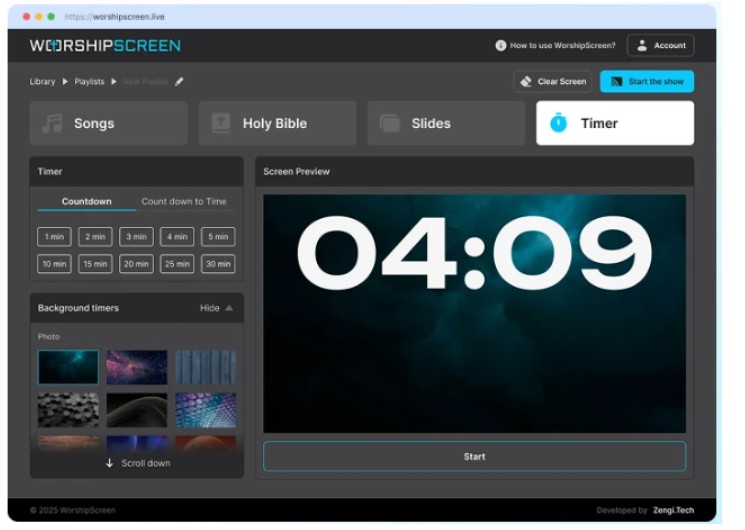
WorshipScreen provides countdown functionality that can be configured for a selected duration or a specific start time. The countdown can also be combined with suitable visual backgrounds.
This is useful not only for Sunday worship but also for conferences, special services, youth meetings, prayer events, and other church gatherings.
Connecting WorshipScreen to a Projector or Television
The software needs to be connected to a display system so the congregation can see the presentation.
One common arrangement is a computer connected to a projector or television through HDMI. The computer can use an extended display so that the operator sees the controls on one screen while the audience sees the presentation on another.
A church may also have a television with browser capabilities. In that case, the presentation can potentially be displayed directly on the television while another device controls the service.
The right configuration depends on the equipment already available at the church. There is no requirement for every congregation to use the same hardware.
Before the service, the operator should test the complete connection. This includes the display, cables, browser, Internet connection, video playback, and sound.
Preparing Everything Before the Congregation Arrives
Preparation is one of the most important parts of successful church presentation management.
The operator should review the complete playlist before the service starts. Every song should be checked for correct lyrics and slide breaks. Bible passages should be verified. Images and videos should be tested.
It is also useful to check the presentation from the back of the room. Text that appears large enough on the operator’s laptop may be difficult to read from the congregation’s seats.
The operator should also confirm that there are no unexpected browser windows, notifications, or other private information that could appear on the projected screen.
A short technical check can prevent many problems during a live service.
Operating the Presentation During Worship
When the service begins, the operator’s role changes from preparation to live coordination.
The playlist provides the structure, but the person controlling the presentation should remain attentive to what is happening on stage.
If the worship leader repeats a chorus, the operator should follow the repetition. If a verse is skipped, the presentation should skip it as well. If the pastor introduces an unexpected Scripture reference, the operator may need to adapt.
The goal is not to display every item as quickly as possible. The goal is to make the right information available at the moment when the congregation needs it.
This is why a simple interface and a well-prepared playlist can make a significant difference. The operator spends less time searching for content and more time following the service.
Using WorshipScreen for Methodist Worship Services
Churches may have different traditions and different orders of worship, but many of their presentation needs are similar.
For congregations searching for methodist worship software, WorshipScreen can be used to organize Methodist worship services around their own established structure.
A church can prepare hymns or contemporary worship songs, add Scripture readings, organize sermon references, display announcements, and use countdowns before services or special events.
The same workflow can be adapted to many other Christian traditions. The platform does not determine how a church should worship. Instead, it provides a presentation environment that can be organized around the church’s existing service format.
This flexibility is particularly useful for churches that conduct different types of services throughout the week.
Creating a Consistent Weekly Workflow
After the initial setup, a church can establish a simple routine for every service.
First, review the order of worship and collect the required songs, Scripture passages, announcements, images, and videos.
Second, create the playlist and put each element in the expected sequence.
Third, review every slide and correct any problems with lyrics, text size, backgrounds, or formatting.
Fourth, test the complete presentation on the actual projector or television.
Finally, open the presentation before the service and keep the control device ready.
This process reduces last-minute changes and makes it easier for different volunteers to take responsibility for the presentation.
Why a Browser-Based Approach Can Be Convenient
A browser-based system provides flexibility that can be valuable to volunteer-led church teams.
There is no need to depend entirely on one computer with a specific software installation. Content can be managed through the web interface, and different compatible devices can be used depending on the church’s setup.
This can be especially convenient when volunteers rotate from week to week. Instead of teaching each person a completely different technical system, the church can establish one standard workflow.
The result is a presentation process that is easier to repeat and maintain.
Keeping the Screen Helpful, Not Distracting
Good church presentation is not about filling every moment with graphics. The screen should support worship, Scripture, preaching, and communication.
Lyrics should be readable. Bible passages should be accurate. Announcements should be concise. Videos should play correctly. Backgrounds should not make text difficult to see.
Simple design is often more effective than excessive animation or decoration.
When the technical system works properly, the congregation may barely notice it. That is usually a sign that the presentation is doing its job: providing the information people need without becoming the focus of attention.
Conclusion
WorshipScreen provides churches with a practical way to organize visual content for worship services. It combines worship songs, Bible verses, sermon materials, announcements, images, videos, and countdowns within a browser-based presentation workflow.
Because it is available as a free tool, it can be considered by churches that want to improve their visual presentations without adding the cost and complexity associated with some professional presentation systems.
The most effective results come from preparation. Build the song library, create the service playlist, check Scripture references, test videos, verify the display, and review the presentation before people arrive. During the service, follow the worship leader and pastor rather than treating the playlist as something that cannot be changed.
With this approach, WorshipScreen can become a practical part of a church’s regular media workflow. Whether the congregation needs a simple system for displaying lyrics or a more complete solution for songs, Scripture, sermons, announcements, and multimedia, the platform provides a flexible foundation for organizing the visual side of a church service.
